Include all features from basic and standard tiers
Highly customized solutions
Unlimited transaction volume / day
24/7 priority support
Priority account manager
Frequently Asked Questions
Find answers to common questions about our features and services.
How do I send money using the app?
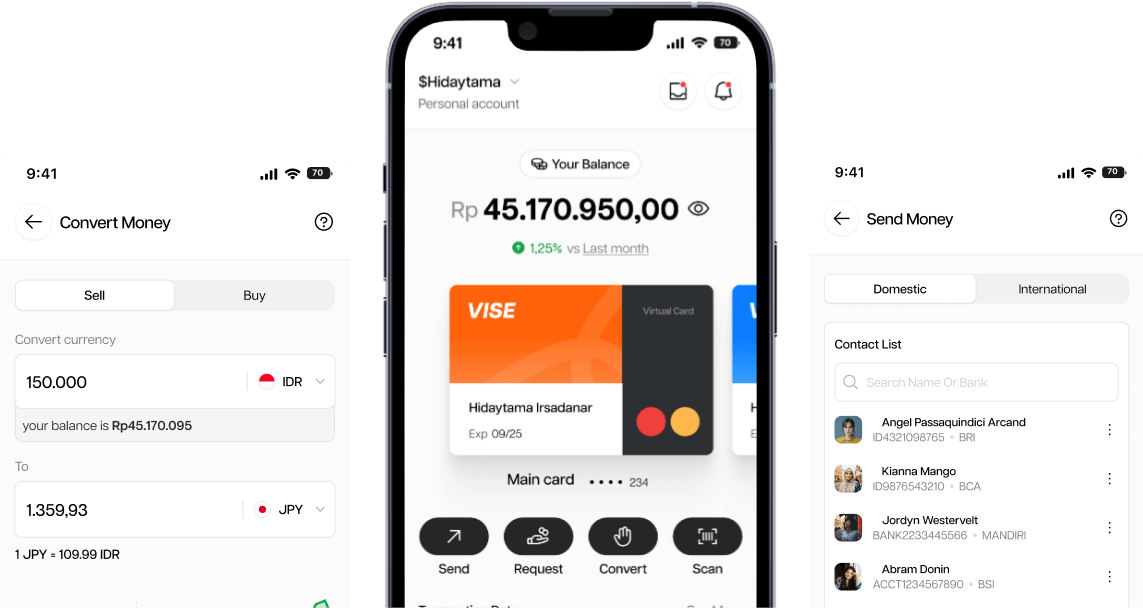
To send money, open the app, select “Send Money,” enter the recipient’s details, input the amount, and confirm the transaction. Your funds will be transferred instantly.
What fees are associated with sending money?
To send money, open the app, select “Send Money,” enter the recipient’s details, input the amount, and confirm the transaction. Your funds will be transferred instantly.
How can I convert currencies in the app?
To send money, open the app, select “Send Money,” enter the recipient’s details, input the amount, and confirm the transaction. Your funds will be transferred instantly.
Can I manage multiple cards in the app?
To send money, open the app, select “Send Money,” enter the recipient’s details, input the amount, and confirm the transaction. Your funds will be transferred instantly.
How do I set up and use the budgeting tools?
To send money, open the app, select “Send Money,” enter the recipient’s details, input the amount, and confirm the transaction. Your funds will be transferred instantly.
Is my financial data secure in the app?
To send money, open the app, select “Send Money,” enter the recipient’s details, input the amount, and confirm the transaction. Your funds will be transferred instantly.
How do I contact customer support?
To send money, open the app, select “Send Money,” enter the recipient’s details, input the amount, and confirm the transaction. Your funds will be transferred instantly.
Can I use the app for international transactions?
To send money, open the app, select “Send Money,” enter the recipient’s details, input the amount, and confirm the transaction. Your funds will be transferred instantly.
How do I send money using the app?
To send money, open the app, select “Send Money,” enter the recipient’s details, input the amount, and confirm the transaction. Your funds will be transferred instantly.
How can I convert currencies in the app?
To send money, open the app, select “Send Money,” enter the recipient’s details, input the amount, and confirm the transaction. Your funds will be transferred instantly.
How do I contact customer support?
To send money, open the app, select “Send Money,” enter the recipient’s details, input the amount, and confirm the transaction. Your funds will be transferred instantly.
How can I convert currencies in the app?
To send money, open the app, select “Send Money,” enter the recipient’s details, input the amount, and confirm the transaction. Your funds will be transferred instantly.
Can I use the app for international transactions?
To send money, open the app, select “Send Money,” enter the recipient’s details, input the amount, and confirm the transaction. Your funds will be transferred instantly.
How do I send money using the app?
To send money, open the app, select “Send Money,” enter the recipient’s details, input the amount, and confirm the transaction. Your funds will be transferred instantly.
Is my financial data secure in the app?
To send money, open the app, select “Send Money,” enter the recipient’s details, input the amount, and confirm the transaction. Your funds will be transferred instantly.
Is my financial data secure in the app?
To send money, open the app, select “Send Money,” enter the recipient’s details, input the amount, and confirm the transaction. Your funds will be transferred instantly.
How do I contact customer support?
To send money, open the app, select “Send Money,” enter the recipient’s details, input the amount, and confirm the transaction. Your funds will be transferred instantly.
Can I use the app for international transactions?
To send money, open the app, select “Send Money,” enter the recipient’s details, input the amount, and confirm the transaction. Your funds will be transferred instantly.
How do I send money using the app?
To send money, open the app, select “Send Money,” enter the recipient’s details, input the amount, and confirm the transaction. Your funds will be transferred instantly.
How can I convert currencies in the app?
To send money, open the app, select “Send Money,” enter the recipient’s details, input the amount, and confirm the transaction. Your funds will be transferred instantly.
How do I send money using the app?
To send money, open the app, select “Send Money,” enter the recipient’s details, input the amount, and confirm the transaction. Your funds will be transferred instantly.
What fees are associated with sending money?
To send money, open the app, select “Send Money,” enter the recipient’s details, input the amount, and confirm the transaction. Your funds will be transferred instantly.
How can I convert currencies in the app?
To send money, open the app, select “Send Money,” enter the recipient’s details, input the amount, and confirm the transaction. Your funds will be transferred instantly.
Can I manage multiple cards in the app?
To send money, open the app, select “Send Money,” enter the recipient’s details, input the amount, and confirm the transaction. Your funds will be transferred instantly.
How do I set up and use the budgeting tools?
To send money, open the app, select “Send Money,” enter the recipient’s details, input the amount, and confirm the transaction. Your funds will be transferred instantly.
How do I contact customer support?
To send money, open the app, select “Send Money,” enter the recipient’s details, input the amount, and confirm the transaction. Your funds will be transferred instantly.
How can I convert currencies in the app?
To send money, open the app, select “Send Money,” enter the recipient’s details, input the amount, and confirm the transaction. Your funds will be transferred instantly.
Can I use the app for international transactions?
To send money, open the app, select “Send Money,” enter the recipient’s details, input the amount, and confirm the transaction. Your funds will be transferred instantly.
How do I send money using the app?
To send money, open the app, select “Send Money,” enter the recipient’s details, input the amount, and confirm the transaction. Your funds will be transferred instantly.
Is my financial data secure in the app?
To send money, open the app, select “Send Money,” enter the recipient’s details, input the amount, and confirm the transaction. Your funds will be transferred instantly.
How do I contact customer support?
How can I convert currencies in the app?
Can I use the app for international transactions?
How do I send money using the app?
Is my financial data secure in the app?
How do I send money using the app?
To send money, open the app, select “Send Money,” enter the recipient’s details, input the amount, and confirm the transaction. Your funds will be transferred instantly.
What fees are associated with sending money?
To send money, open the app, select “Send Money,” enter the recipient’s details, input the amount, and confirm the transaction. Your funds will be transferred instantly.
How can I convert currencies in the app?
To send money, open the app, select “Send Money,” enter the recipient’s details, input the amount, and confirm the transaction. Your funds will be transferred instantly.
Can I manage multiple cards in the app?
To send money, open the app, select “Send Money,” enter the recipient’s details, input the amount, and confirm the transaction. Your funds will be transferred instantly.
How do I set up and use the budgeting tools?
To send money, open the app, select “Send Money,” enter the recipient’s details, input the amount, and confirm the transaction. Your funds will be transferred instantly.
Is my financial data secure in the app?
To send money, open the app, select “Send Money,” enter the recipient’s details, input the amount, and confirm the transaction. Your funds will be transferred instantly.
How do I contact customer support?
To send money, open the app, select “Send Money,” enter the recipient’s details, input the amount, and confirm the transaction. Your funds will be transferred instantly.
Can I use the app for international transactions?
To send money, open the app, select “Send Money,” enter the recipient’s details, input the amount, and confirm the transaction. Your funds will be transferred instantly.
How do I send money using the app?
To send money, open the app, select “Send Money,” enter the recipient’s details, input the amount, and confirm the transaction. Your funds will be transferred instantly.
How can I convert currencies in the app?
To send money, open the app, select “Send Money,” enter the recipient’s details, input the amount, and confirm the transaction. Your funds will be transferred instantly.
Is my financial data secure in the app?
To send money, open the app, select “Send Money,” enter the recipient’s details, input the amount, and confirm the transaction. Your funds will be transferred instantly.
How do I contact customer support?
To send money, open the app, select “Send Money,” enter the recipient’s details, input the amount, and confirm the transaction. Your funds will be transferred instantly.
Can I use the app for international transactions?
To send money, open the app, select “Send Money,” enter the recipient’s details, input the amount, and confirm the transaction. Your funds will be transferred instantly.
How do I send money using the app?
To send money, open the app, select “Send Money,” enter the recipient’s details, input the amount, and confirm the transaction. Your funds will be transferred instantly.
How can I convert currencies in the app?
To send money, open the app, select “Send Money,” enter the recipient’s details, input the amount, and confirm the transaction. Your funds will be transferred instantly.
How do I send money using the app?
To send money, open the app, select “Send Money,” enter the recipient’s details, input the amount, and confirm the transaction. Your funds will be transferred instantly.
What fees are associated with sending money?
To send money, open the app, select “Send Money,” enter the recipient’s details, input the amount, and confirm the transaction. Your funds will be transferred instantly.
How can I convert currencies in the app?
To send money, open the app, select “Send Money,” enter the recipient’s details, input the amount, and confirm the transaction. Your funds will be transferred instantly.
Can I manage multiple cards in the app?
To send money, open the app, select “Send Money,” enter the recipient’s details, input the amount, and confirm the transaction. Your funds will be transferred instantly.
How do I set up and use the budgeting tools?
To send money, open the app, select “Send Money,” enter the recipient’s details, input the amount, and confirm the transaction. Your funds will be transferred instantly.
How do I contact customer support?
To send money, open the app, select “Send Money,” enter the recipient’s details, input the amount, and confirm the transaction. Your funds will be transferred instantly.
How can I convert currencies in the app?
To send money, open the app, select “Send Money,” enter the recipient’s details, input the amount, and confirm the transaction. Your funds will be transferred instantly.
Can I use the app for international transactions?
To send money, open the app, select “Send Money,” enter the recipient’s details, input the amount, and confirm the transaction. Your funds will be transferred instantly.
How do I send money using the app?
To send money, open the app, select “Send Money,” enter the recipient’s details, input the amount, and confirm the transaction. Your funds will be transferred instantly.
Is my financial data secure in the app?
To send money, open the app, select “Send Money,” enter the recipient’s details, input the amount, and confirm the transaction. Your funds will be transferred instantly.
How do I send money using the app?
To send money, open the app, select “Send Money,” enter the recipient’s details, input the amount, and confirm the transaction. Your funds will be transferred instantly.
What fees are associated with sending money?
To send money, open the app, select “Send Money,” enter the recipient’s details, input the amount, and confirm the transaction. Your funds will be transferred instantly.
How can I convert currencies in the app?
To send money, open the app, select “Send Money,” enter the recipient’s details, input the amount, and confirm the transaction. Your funds will be transferred instantly.
Can I manage multiple cards in the app?
To send money, open the app, select “Send Money,” enter the recipient’s details, input the amount, and confirm the transaction. Your funds will be transferred instantly.
How do I set up and use the budgeting tools?
To send money, open the app, select “Send Money,” enter the recipient’s details, input the amount, and confirm the transaction. Your funds will be transferred instantly.
Is my financial data secure in the app?
To send money, open the app, select “Send Money,” enter the recipient’s details, input the amount, and confirm the transaction. Your funds will be transferred instantly.
How do I contact customer support?
To send money, open the app, select “Send Money,” enter the recipient’s details, input the amount, and confirm the transaction. Your funds will be transferred instantly.
Can I use the app for international transactions?
To send money, open the app, select “Send Money,” enter the recipient’s details, input the amount, and confirm the transaction. Your funds will be transferred instantly.
How do I send money using the app?
To send money, open the app, select “Send Money,” enter the recipient’s details, input the amount, and confirm the transaction. Your funds will be transferred instantly.
How can I convert currencies in the app?
To send money, open the app, select “Send Money,” enter the recipient’s details, input the amount, and confirm the transaction. Your funds will be transferred instantly.
How do I contact customer support?
To send money, open the app, select “Send Money,” enter the recipient’s details, input the amount, and confirm the transaction. Your funds will be transferred instantly.
How can I convert currencies in the app?
To send money, open the app, select “Send Money,” enter the recipient’s details, input the amount, and confirm the transaction. Your funds will be transferred instantly.
Can I use the app for international transactions?
To send money, open the app, select “Send Money,” enter the recipient’s details, input the amount, and confirm the transaction. Your funds will be transferred instantly.
How do I send money using the app?
To send money, open the app, select “Send Money,” enter the recipient’s details, input the amount, and confirm the transaction. Your funds will be transferred instantly.
Is my financial data secure in the app?
To send money, open the app, select “Send Money,” enter the recipient’s details, input the amount, and confirm the transaction. Your funds will be transferred instantly.
Approved and Monitored by
Certified and reviewed by leading experts to guarantee the highest standards